Grapevine Nursery Workflow

Hello, I am not yet an active user of the AgOpenGPS system, but before purchasing I would like to check certain things, if this system also allows them. I do not need an exact explanation of how this can be done, but only if it is 100% feasible, so that I can decide on this product more easily. This information is very important to me because of the organization itself, which would save me a lot of time.

We are producing approximately 150,000 grapevine nursery plants each year.

Our workflow is different from typical row-crop farming, so I would like to know if AgOpenGPS already supports the following workflow.


Field layout

  • Row spacing (center-center): 1100 mm
  • 9 rows per block
  • 3 m tractor lane
  • Rows are perfectly straight (200–300 m long)
A1 A2 A3 A4 A5 A6 A7 A8 A9 <- 3 m tractor lane -> B1 B2 B3 B4 B5 B6 B7 B8 B9


1. Permanent guidance lines

Can I create all AB lines once during mulch laying and reuse exactly the same lines weeks later for:

  • Weeding
  • Trimming
  • Spraying
  • Harvesting

without creating new AB lines?

The tractor should always drive on the same RTK line .


2. Driving sequence

Normally operators drive:

A1
A2
A3
...

We would like to work like this:

A1 → B1 → A2 → B2 → A3 → B3 ...

Reason:

Two tractors work together.

  • Tractor 1 = rotary harrow
  • Tractor 2 = mulch layer

With this sequence both tractors continuously circulate and never have to wait for each other at the headland.

Is this workflow possible in AgOpenGPS?


3. Fixed Start and End lines

Every row should start and end at exactly the same GPS position.

Example:


START LINE
========================

300.00 m

========================
END LINE

Questions:

  • Can AgOpenGPS define a fixed Start Line ?
  • Can AgOpenGPS define a fixed End Line ?
  • Can it display the distance to Start/End?
  • Can it warn the operator exactly when to start and stop the implement?

Goal:

Every row should be exactly 300.00 m long.


4. Saved field project

Can one field permanently store:

  • AB lines
  • Row spacing (1100 mm)
  • Number of rows
  • Tractor lanes
  • Start/End lines

so that next time I simply open the same field and continue working on exactly the same guidance lines?


Thank you very much.

I believe this workflow could also be useful for vineyards, orchards and other perennial crops where the same RTK guidance lines are reused throughout the entire season.

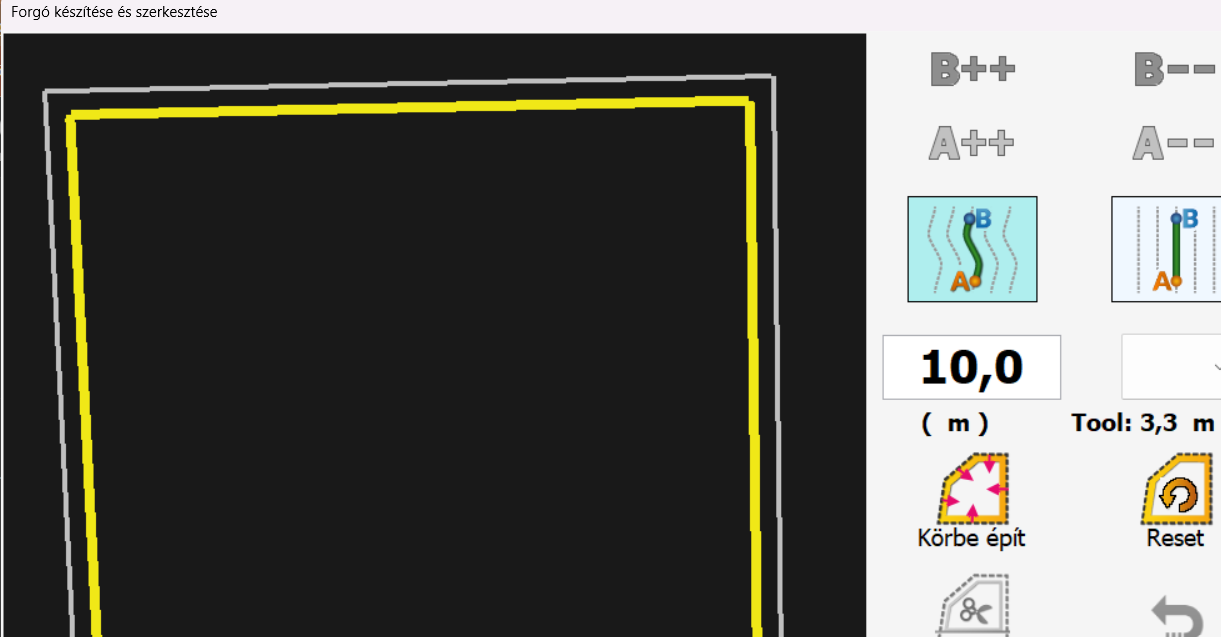
So we can imagine this as 55cm + 880cm + 300cm + 880cm + 55cm (as A9 and B1 has 300cm) and I guess we need half a row before A1 and after B9 (which is where we’ll start the sequence again)
So that’s 21m and 70cm which is how I’d define my tramlines. That way the 3m tractor lane would be easily visible.
Question: Your sprayer is 21m?
I guess that 2 half row at the beginning / end is something you don’t fully cover? (so that 55cm will get 20cm covered that’s enough for the plant itself but not the interrow thing.)

Asking this because it would make life a bit simpler if that 3m tractor lane would be a multiple of that 110cm… But if we make it 330cm you’d need a 22m sprayer.

Yes you can.

So between A1 and B1 we’d have 11 rows to skip. The UI currently allows 9 but I guess that’s
something one can easily modify with a single AI prompt :slight_smile:
But this is only true if we accept the 3.3m tractor lane!

Create the field via KML file and you can edit the boundary.
For example if you need 10m at the headland I’d make it 300+2x10 = 320m and add a headland of 10m at each end. So in AgOpenGPS you’d have a marker where your actual field starts.

Yes but:

This is related to the implement itself. So if you have it as a 1.1m wide implement (btw are you putting down 1 row or you’re putting down 2-3 rows at a time? ) then it’ll say at how many passes are you from your reference (edge of field).

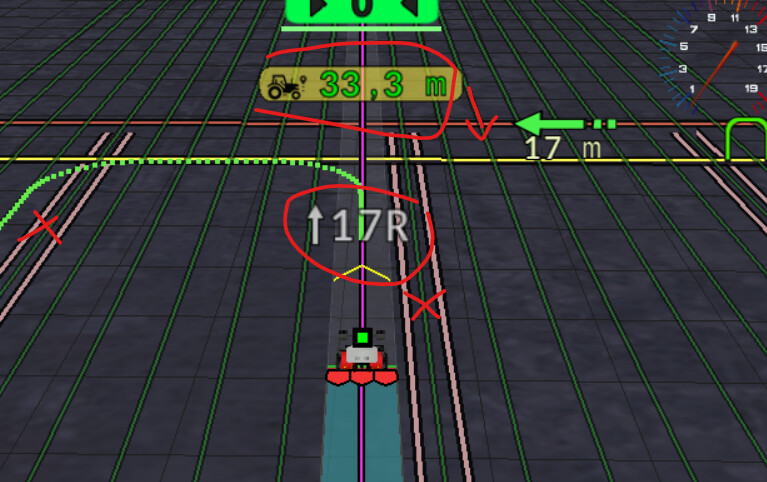
Lets say you’re putting down 3 rows at a time and the counter says it says 23. that means we’ve now 2 tractor lines so we’ve put down 21*3=63 rows of plants. So it doesn’t really say it but you can figure it out. It does display that we’re at 23L .

Lets agree on a 3.3m tractor lane and we have a deal :slight_smile:

If it were me, I’d drive it and record it.


here is my drawing just for better understanding.

Thank you, I now understand your suggestion better. I made a drawing and will attach it to this reply.

The crop rows would remain on one continuous 1100 mm guidance grid. The raised beds are approximately 350–400 mm wide.

Between A9 and B1, I can use three normal 1100 mm spacing increments:

A9 → unused line 1 → unused line 2 → B1

Therefore:

A9 to B1 centre-to-centre distance:
3 × 1100 mm = 3300 mm

With approximately 400 mm wide beds, the clear tractor lane between the bed edges would be:

3300 − 200 − 200 = 2900 mm

A clear tractor lane of approximately 2.9 m would be acceptable for us.

I understand your proposal as creating an effectively continuous or unlimited sequence of guidance lines at 1100 mm spacing. AgOpenGPS would not need to recognise the tractor lane as a special area. The two lines located inside the tractor lane would simply not be used for planting:

A1 A2 A3 A4 A5 A6 A7 A8 A9 X1 X2 B1 B2 B3 ...

The working sequence should be:

A1 → B1 → A2 → B2 → A3 → B3 ...

From A1 to B1:

  • A2 to A9 are eight unused target lines during that pass;
  • X1 and X2 are the two unused lines inside the tractor lane;
  • B1 is therefore eleven 1100 mm spacing increments away from A1.

So the lateral movement from A1 to B1 is:

11 × 1100 mm = 12.1 m

However, there are only 10 guidance lines between A1 and B1.

How does the AgOpenGPS skip function count this?

Would I select:

  • skip 10 lines, because there are ten lines between A1 and B1; or
  • move 11 line spacings, because B1 is eleven 1100 mm increments away from A1?

You mentioned that the current user interface allows a maximum value of 9. Depending on how AgOpenGPS counts, would this limit therefore need to be increased to 10 or 11?

Would it then be possible to use the following sequence continuously without manually selecting each guidance line?

A1 → B1 → A2 → B2 → A3 → B3 ...

Spraying workflow

I also want to clarify how we spray these blocks.

We do not drive in the centre of the 2.9 m tractor lane.

When spraying one side of a nine-row block, the tractor drives closer to the nearest crop row. The tractor guidance line would be positioned at a user-defined distance X from the centre of the nearest crop row.

For example:

centre of nearest crop row → distance X → centreline of tractor

I would choose the value of X according to:

  • tractor width;
  • tyre clearance from the raised bed;
  • required length of the spraying arm;
  • exact nozzle positions.

Once X is chosen, I would build and adjust the spraying boom so that every nozzle is centred exactly over its corresponding crop row.

We then spray the block in two passes:

first tractor lane: spray approximately one half of the nine-row block
second tractor lane: spray the remaining half of the same block

The tractor goes up along one side of the block and returns along the other side. After both passes, the complete block is sprayed.

The spraying guidance line is therefore not the centre of the tractor lane and is also not one of the planting lines. It is a separate line located at the chosen distance X from the nearest planted row.

How would you configure this in AgOpenGPS?

Would the best solution be to:

  1. create and save a separate set of spraying AB lines, each positioned at distance X from the nearest crop row;
  2. create the spraying lines from the original 1100 mm planting grid using a fixed guidance-line offset;
  3. use tramline functionality with the tractor path offset toward the block being sprayed?

It is important that the same saved spraying lines can be reopened each time and that the tractor always follows exactly the same distance X from the nearest crop row.

One more clarification regarding the working sequence:

We always work one row per pass, but the preferred driving sequence depends on the operation.

During mulch laying, the alternating sequence is very important:

A1 → B1 → A2 → B2 → A3 → B3 ...

This allows two tractors to circulate continuously without waiting for each other.

For later operations, such as trimming, mechanical cultivation, fertilising or similar work, we may prefer a different sequence and circulate within one block, for example:

A1 → A2 → A3 → A4 ...

or another sequence that minimises unnecessary travelling and turning.

Therefore, my more general question is:

Can the operator define or select the desired guidance-line sequence for a particular job?

For example, can AgOpenGPS:

  • automatically select the next line according to a predefined sequence;
  • use different saved sequences for different operations;
  • alternate between two blocks for mulch laying;
  • but work consecutively inside one block for cultivation or fertilising?

Or does AgOpenGPS always choose the next guidance line only by a fixed skip value or by the nearest line after turning?

Since we work one row per pass, flexible control of the next selected line is more important to us than the implement width itself.

You can download AgOpenGPS, turn on simulator mode and you can see if you can find a method that works for you.

Download the latest version here:

Turn simulator on by clicking the top left hand of screen and turning simulator on in the drop down menu.

You can then test everything out from the comfort of your armchair.

Of course it’s open source so you can change and add to the code.

If you are not good at coding and development it might be much easier to change your work method to fit in with how AgOpenGPS works at present.

Great. I’d be happy to try the stimulator and maybe adapt it to my needs.

You can pull the line under you for spraying. And U turn usage isn’t a must either.