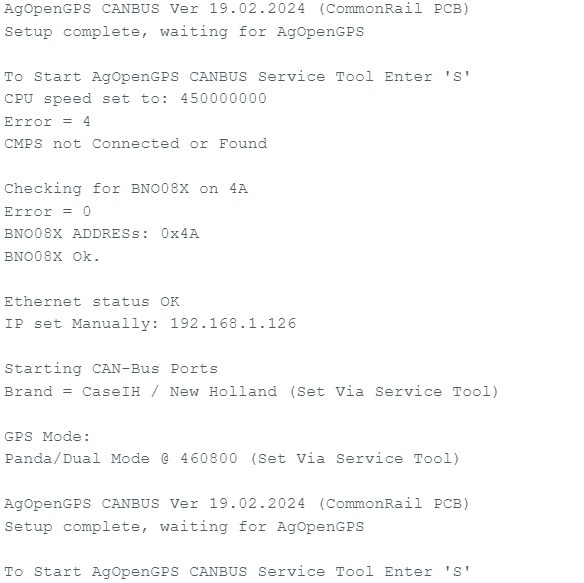
Just checked all that. Below is the message i have on service tool.
I also “uncommented” the line below as instructed
Is there any other lines i need to uncomment?
Just checked all that. Below is the message i have on service tool.
I also “uncommented” the line below as instructed
Is there any other lines i need to uncomment?
Just reflashed the f9p.
Same story.
Almost certain this is an issue i am having in firmware, either by not flashing it right etc.
The fact the it works when i flash the AIO v4.1 firmware. Then doesn’t work when i pick the firmware designed for steer ready machines.
From your picture it says its the tonys canbus version
You need the aio modified version
Ive never uncommented the line in your picture
The file name i am using is “Autosteer_AOGv5_Teensy4.1UDP_SteerReadyCAN_AIOModified.ino”
Unless it has been saved in the repository wrong… or i’m getting it in the wrong place?
Repositories, boards, CANBUS, CANBUS firmware, Autosteer_AOGv5_Teensy4.1UDP_SteerReadyCAN_AIOModified
Maybe i need to find it somewhere else?
I haven’t tried this, but would the other file work that’s in CANBUS firmware folder. “AIO_v4_CANBUS_Firmware”
Thats the right firmware file
Have you tried without editing that line?
That other firmware is for the custom canbus board so doesn’t work with the aio pcb
Trying it now.
I am getting some errors on my output screen. I will send you a message as some info on them i don’t want shared re business names on my file system.
These are related to nmea
Not too sure on that.
Sounds like possibly a problem with your arduino ide as you said with configomatic it works for you
Try using configomatic aio canbus then use arduino to do the serial monitor bit
Just done that now. GPS still not appearing.
Pulling my hair out (what’s left of it) at this point.
I configured using canbus-all-in-one
Open arduino
Serial monitor
S send
P send
2 send
Then closed arduino, closed configomatic to be sure.
Plugged it all up.
Steer and imu, green. Gps still doing nothing.
When you say it’s correct, do you mean the AIO V4 CANBUS Firmware, or the Autosteer_AOGv5_Teensy4.1UDP_SteerReadyCAN_AIOModified
I do not know what i done differently. But it is all working now!
Thanks again Del_boy. Great help as always
Hi, getting back to this. What’s the current situation with configomatic regarding CNH canbus firmwares? What version is the one that will work with only one canbus? And can I update to it with configomatic? @TeddyStamford @andyinv
The firmware I’m on requires two buses connected. Another problem with it is that in addition to the joystick autosteer button, also the button on the backside of the joystick is engaging autosteer. The one that’s used for auto transmission mode (“cruise control”). Would like to get that sorted out so that only the autosteer button would be used.
Hello everyone,
I am currently trying to get AgOpenGPS working on my New Holland T5.110 Dynamic Command 2021 with the factory Steer Ready system. My setup consists of a Standard AIO v4.5 board, Teensy, BNO085, and a UM982 GNSS receiver. I am using the factory wheel angle sensor (WAS) connected through the original tractor wiring harness, and the tractor already has the factory electro-hydraulic steering valve.
Using the service menu, I successfully unlocked CH1 and CH2 in the HH menu and performed both the WAS calibration and the Spool calibration. The steering valve is definitely working because during the calibration the tractor automatically turned the wheels left and right.
However, I am not sure if I performed the Spool calibration correctly. When the display showed “MOVE”, I only moved the steering wheel slightly to the left and right. After that, the tractor automatically turned the wheels a small amount in both directions and the calibration completed successfully. Should the steering wheel actually be turned all the way to both steering stops when “MOVE” appears, or is only a small movement required? I would really appreciate it if someone familiar with this procedure could explain the correct calibration process.
I have also been trying to connect AgOpenGPS to the tractor through the H and J pins, but I cannot get any communication. I tried several firmware configurations generated with AOGConfigOMatic, but none of them seem to work correctly with this tractor.
Has anyone here successfully connected AgOpenGPS to a 2021 New Holland T5 Dynamic Command Steer Ready tractor? If so, could you please share which firmware you used and whether any modifications were required? Any advice regarding the correct firmware, CAN configuration, or steering setup would be greatly appreciated.
Thank you very much for your help!
The was and spool calibration isnt the easiest to do.
During the spool part of the calibration the wheels are constantly moving left and right, only small amounts, the whole spool calibration takes about 2 mins
Have you set channel 1 and channel 2 both to yes
On the inteliview screen top left you should get a picture of a steering wheel symbol. When you toggle the master switch it should go from road to field mode
Check you have the correct firmware and you need to select the nh traitor brand which is number 2 i think, you cant use configomatic for this you need arduino ide to edit the tractor brand and select P for panda messages.
The firmware is located further up the thread
Pins h and j are correct or you can use pins 3 and 13 at the nav controller plug
Thank you, that makes sense. So if the wheels were only moving slightly left and right during the spool calibration, I assume both the WAS and Spool calibrations were completed successfully.
I also have one more question. Is the switch marked “A” in the attached photo the correct master switch for enabling/disabling the factory steering system?
Could you also show me what the Road Mode and Field Mode steering wheel icons look like on the IntelliView display? I would like to make sure my tractor is switching between them correctly.
Thank you!
Sound’s like calibration was successful
The master switch is the single on off switch with just picture of a steering wheel
When you toggle it you should see the steering wheel move a bit
The same picture as the switch should appear in the top left of inteliview screen. Road mode will have steering wheel with a road and padlock symbol.