So can we use it now for fmx or fm1000 with out changing the messages?
I have a base station that recently started boot looping so I put the micro sd card in a different rasberry pie and it worked but it lost my setting. Is there a way to get them back or do I just need to reset up everthing?
If you didn’t backup your settings, you have to start from scratch. Or your base is registered on the Centipede-RTK network, then you can enter the coordinates from the report you sent to the admin team.
Please try and inform us with the results.
1 Like
I didn’t backup my settings so I guess I will start from scratch. I will have to back them up this time in case it happens again.
Thank you for another update Stefal! I have been using and relying on your great project for several years now.
I installed a fresh version of Trixie, sudo update/upgrade, and then installed RTKBase 2.7.0. The installation script ran to completion but I experienced a bunch of gpsd.service issues and was not able to access the web host. Similar or identical to #502. In my case I am using an F9P connected to the Pi’s serial GPIO connection.
The next day I started over from scratch again. This time everything worked fine. The only difference is that the second time I ensured the hardware serial was active with raspi-config before installing RTKBase.
My issue could be a fluke but I see that issue #502 also involves a GPIO serial connection. There may be a connection? I didn’t want to open a separate issue on such weak information.
I unfortunately did not save any logs and the Pi has been reinstalled into it’s home in a high and icy location where it is not simple for me to try another fresh install.
What kind of behavior would you have liked to see?
Is it possible to update from Debian 11 to 13 without physical access to the pi3, if possible is there a guide for that or do I have to go up to the silo and get it?
There are ways but no good ways or supported ways. I failed at my attempt to remotely upgrade 11 to 13 and had to climb.
If you had a USB stick in the Pi then you could format it, download an image to it, boot from it, then do the same to the SD card.. That’d be a straight forward way to do it. Any methods that don’t involve a secondary storage medium are pretty intensive and have a high likelihood of failing.
2 Likes
We have been talking about the improvement that a portable Base station for Opengrade3D would mean, looking for information on how to make it work, I found that TractorPilot has an option to fix the position of the Base with the use of NTRIP, connecting to a fixed base and establishing the coordinates. Would it be possible to do something like this in RTKBase?

You can try this
It only works with this one
1 Like
Hi I just set up another base station, I already have one working for 2 years with no issues. However, new one wont start and I am not sure whats the problem. Different location, different router. Router has a password but im using ethernet with cable so I believe it doesnt require a password.
This is what I get on screen:
Once it starts with this it just keeps going on without stopping.
The router is huawei b310s-22
Does it print any warnings before it starts frantically scrolling? The video is too blurry to read…
I slowed the video down and this is what it says at the end:
rootfs contains a file system with errors
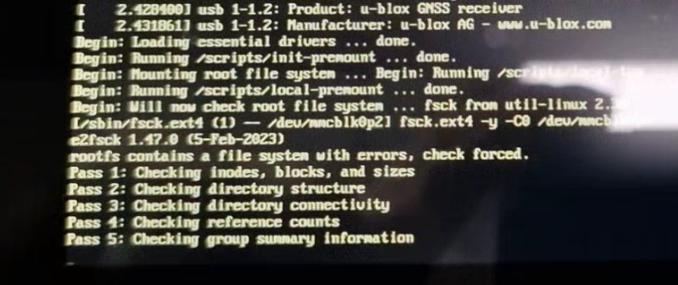
next frame is wierd numbers.
I will try to reflash the sd card
I brought it home and reflashed both f9p and sd card. At first it didnt work again but when I dettach the hdmi cable I saw lights, put back the hdmi in and it was working. Tried again with display and its not working again, without display plugged in it works. Weird… but its okay display wont be used anyway so my last concern is if it booted first time with my router is it going to work when I plug it in in different?
Hey all,
Having a bit of a problem here and looking for some clarification. Flashed the program to the Pi and had the base program working properly and had the browser working as well. I turned it off for a few weeks as I was moving it around and fired the Pi back up. It won’t connect to the same browser address, though according to the rtk2go caster report the data is still pushing out.
Am I missed a step or do I have to reload the Pi program and redo the entire thing?
Likely the local IP address for the base just changed. If you connect to the router and look through the connected devices or do a network scan you should be able to find it.
2 Likes
Was able to track the new IP down, thanks for the advice.
1 Like
Hi Stefal I had time yesterday and I said I’ll make another orangePi base station, if the working one is in season… I said I’ll try it out just like I have on a debian 11, it installed rtkbase without any problems, to my surprise. It didn’t want to do it last time as I wrote in the previous post.
Did you change something in the script? and it installed 2.7.0 RTKBase. I thought it wouldn’t work on debian 11 anymore.
Has anyone tried the base with ardusimple rtk3b with the um980, we had a base that was having trouble connecting and disconnecting sometimes during driving, and we weren’t sure if it was the base or internet connection, but changed the antenna and receiver and now the base connects very fast to agopen, and hasn’t disconnected during this weekends work.
Configuration af the um980 was easy and just did everything on the web browser.
Can anyone remember how the numbers that count down under the mount point in agopen means, higher the better?